

28 May AI in Design Workflows: Exploration to Application
In ‘AI as a Creative Design Partner’ Key Tech’s Industrial Design Department explored how emerging generative AI tools might support our design process through a mock project case study and development of initial internal use and application guidelines. At the time, AI was full of promise but still unproven in day-to-day work. Since then, our team has moved beyond experimentation and began integrating generative AI into client, marketing, and proposal work. While the field continues to evolve rapidly, we’ve learned better where it genuinely adds value and where it still falls short.
Strong Suits: Real Use Cases
- User Research Analysis and Synthesis
One of the most practical ways we’ve used generative AI has been during Voice of Customer programs to help organize information faster and identify patterns more efficiently. For example, the department has started to use Marvin: an AI-powered qualitative research platform and repository. After uploading and tagging interview responses, we can pose targeted questions to the software to summarize response themes and patterns [Figure 1]. The AI helps accelerate the heavy lift of sorting and structuring data so we can focus more time on translating insights into clear design directions.
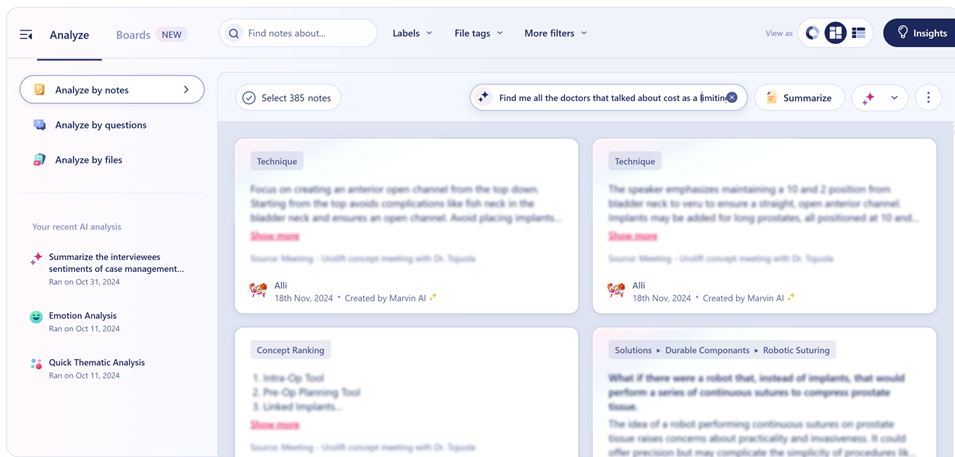
Figure 1: Posing a question about interview data to Marvin’s AI Analysis tool
- Quick Ideation and Inspiration Gathering
Generative AI has also proven useful to us during early ideation, when exploring a wide range of visual directions quickly matters more than polish. For example, Midjourney’s Moodboard functionality has recently allowed us to generate ideas for custom Key Tech-branded icons. We first uploaded previously designed icons into the software to create a Moodboard, which was then used as a style reference in prompts to generate new ideas in the same look and feel. Outputs were not used as final designs but rather as jumping off points for us to refine [Figures 2, 3, 4].
-

- Figure 2: Key Tech icons uploaded to Midjourney Moodboard
-
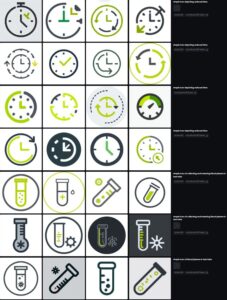
- Figure 3: Generating new icon ideas with Moodboard as style reference
-

- Figure 4: AI supplemented work output
- Enhancing Presentation Content and Marketing Visuals
We’ve also used AI-generated imagery to support presentation materials. For example, we used Midjourney to create images for a talk we presented at this year’s PODD: Partnerships in Drug Delivery’s annual conference. Instead of searching for non-confidential imagery from past projects, AI allowed us to quickly build images for specific topics [Figures 5, 6].
-

- Figure 5: Midjourney generated image of two autoinjectors to illustrate the aesthetic usability effect and A/B testing
-

- Figure 6: Midjourney turned a screenshot from a VoC recording into an illustration to maintain patient confidentiality
We’ve also recently used Midjourney and Vizcom’s Animation capabilities to quickly bring to life still images in marketing and proposal decks [Figures 7,8]. These tools help us to build strong visuals without relying on stock imagery or spending excessive time producing assets from scratch.
-
- Figure 7: GUI mockup animated in Midjourney
-
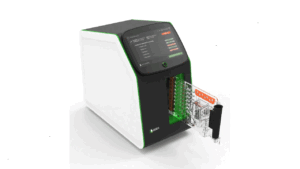
- Figure 8: Keyshot render animated in Vizcom
- Image Editing and Post-Production
Perhaps where our design team currently finds the most frequent use for generative AI is in image editing and post-production workflows. Photoshop’s AI-powered tools, for example, are regularly used to remove unwanted elements from the background of images more efficiently and faster than traditional retouching methods [Figures 9, 10, 11].
-

- Figure 9: Original photograph
-
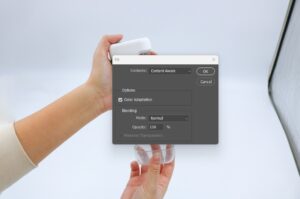
- Figure 10: Photoshop’s AI-enabled content-aware fill tool
-

- Figure 11: Unwanted background elements seamlessly removed
Similarly, Photoshop’s generative-AI tools have supported in-context render backdrops, helping us place products in more realistic or visually engaging environments [Figures 12, 13, 14].
-
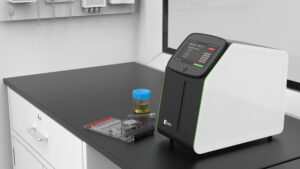
- Figure 12: Original Keyshot render
-

- Figure 13: Photoshop AI-generated window view of bushes with blinds
-

- Figure 14: Photoshop AI-generated window view of city
Ongoing Shortcomings
While generative AI has become a useful addition to our toolkit, its limitations remain clear. For one, the quality of output is directly tied to the quality of input. AI cannot independently problem-solve, challenge assumptions, or push beyond what it is prompted to do. Without strong direction, results can quickly plateau. Generative AI also still lacks true understanding of 3D design, perspective, manufacturing constraints, and real-world feasibility in many cases. Any output related to form, proportion, or production must be reviewed carefully by experienced designers and engineers. Finally, security and confidentiality considerations continue to be a challenge. Careful consideration is required to ensure proprietary or sensitive information is never exposed, and this limits which tools we use, and where and how they can be used.
What’s Next
The gap between AI hype and practical reality remains significant. Generative AI is not a shortcut to good design, and it does not replace experience or critical thinking. Designers still need time to experiment, learn, and reflect – not just produce more work faster. Looking ahead, we plan to continue refining our internal best practices. This includes maintaining use of tools like ChatGPT, Marvin and Midjourney, conducting quarterly audits to stay current as platforms evolve, and evaluating additional tools such as Vizcom where they make sense. We’re also planning to experiment with creating an AI-assisted approach to early design reviews through a custom GPT or tool like Figma Make. We envision the AI could be used to flag inconsistencies, redline renders, offer early DFM considerations, and provide high-level subjective feedback. As these experiments progress, we plan to share updates in a future post. For now, our approach remains intentional and grounded: using generative AI where it truly supports better thinking, clearer communication, and stronger outcomes.

Alli is a native of Milwaukee, WI and graduated from the University of Cincinnati with a BS in Industrial Design and a Minor and Business Certificate in French. Prior to Key Tech, she designed watches for Fossil Group in Dallas, TX. When not designing, she can be found listening to live music, making travel plans, or hanging out with her cat Disco.
- AI in Design Workflows: Exploration to Application - May 28, 2026
- AI as a Creative Design Partner - August 20, 2025
- Rx for Excellence: Leveraging Workflow Pain Points - May 28, 2024